
Separate tachograph download schedules
The Teltonika WEB TACHO service splits tachograph downloads into two schedules: one for the driver card and one for the lorry, even though there is only a single FMC650 tracker on the vehicle.
The Teltonika WEB TACHO service splits tachograph downloads into two schedules: one for the driver card and one for the lorry, even though there is only a single FMC650 tracker on the vehicle. Any haulier with more drivers than tractor units will recognise why this matters. Today one person is behind the wheel, tomorrow a relief driver, next week a third. The driver card travels from vehicle to vehicle while the tachograph stays put. Download everything on one shared schedule and the records of different people end up in the same file, leaving someone to work out by hand who drove how far and who rested when. In this case study Teltonika shows how the WEB TACHO platform treats the driver and the vehicle as two separate objects, each with its own remote download interval.
What this scenario solves
A logistics company usually has more drivers than it has lorries fitted with trackers.
Over a month one driver may work on three or four different vehicles.
On a single tractor unit it is not unusual for two people to swap over within twenty-four hours.
The download deadlines for cards and for the tachograph itself are different, so the manager has to keep them in his head or in a spreadsheet.
A logistics company usually has more drivers than it has lorries fitted with trackers. Over a month one driver may work on three or four different vehicles. On a single tractor unit it is not unusual for two people to swap over within twenty-four hours. The download deadlines for cards and for the tachograph itself are different, so the manager has to keep them in his head or in a spreadsheet.
In the past the tracker and tachograph were treated by the system as a single object. Downloads ran on one schedule, and the DDD file contained both the vehicle data and the records of everyone who had driven it during that period. For analysing driving and rest times this is awkward: the shifts of two drivers land in the same download, and separating one from the other is impossible without manual work.
Hence the second problem. The manager spends hours fitting the download schedule around the drivers' rosters, and every driver change mid-run means rebuilding it. Mistakes come easily: miss a card download deadline and there is a hole in the archive that can no longer be filled.
Checking takes time too. When the records of several people and of the vehicle sit mixed together, the only way to be sure that everything has been downloaded on time and in full for each driver is to go through the files one by one.
What Teltonika offers
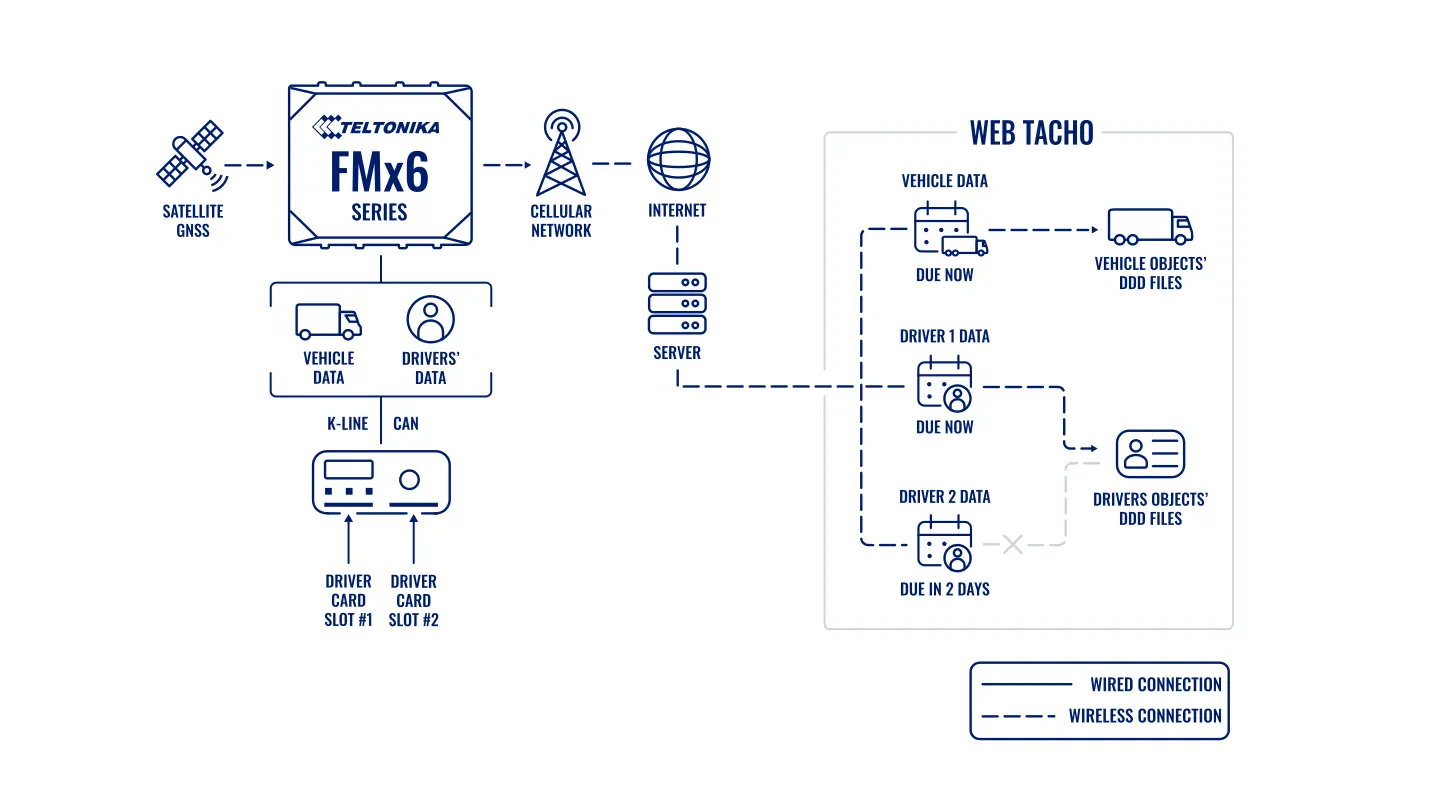
WEB TACHO maintains two independent download schedules on a single tracker: one for the vehicle and one for each driver whose card has been in the tachograph.
Installation and setup
Fitting the device and configuring it for the fleet scenario at hand.
Data transfer
The device collects data and sends it to the monitoring platform; how often depends on the model and its settings.
Analysis and control
The person in charge gets reports and alerts and looks into what stands out.

Here is how it is put together. The lorry carries an FMC650 tracker from the Teltonika professional range. It is connected to the digital tachograph and through it gains access to the unit's memory and to the card in the slot. As far as the platform is concerned this is one physical object. But as soon as the tracker is linked to WEB TACHO, the server starts running two queues for it: downloads of the tachograph's mass memory and downloads of the driver cards.
An example. Two drivers took turns on a tractor unit over the course of a week. The vehicle data is downloaded once, on the vehicle's own schedule. Each driver's card is downloaded separately, on its own schedule and at a moment when that card happens to be in the tachograph. The archive ends up with clean files: one for the vehicle and one for each person, with nothing mixed together.
New drivers are added by themselves. If a card the system has not seen before is inserted into the tachograph, WEB TACHO automatically creates a Driver object and assigns it the default download interval set for the whole fleet. The manager can change that interval: for one person, for a group or for everyone at once.
The dispatcher sees all of it in a browser. The list of vehicles and drivers, the date of the last download, the next scheduled one, the status. Files can be opened or downloaded from any computer; no separate program is needed.
Files are held on a secure server and only users with the relevant rights can reach them. Alongside the standard DDD format the platform accepts the Spanish TGD and the French V1B and C1B, which is convenient for anyone working with European counterparties and their analysis software.
What has to be on the vehicle before you start. A digital tachograph that supports remote downloading, an FMC650 connected to it, and either a company card in the tachograph or a remote company authentication arrangement that the service supports. Without company authorisation the tachograph will not release the file, and the separate schedules will never begin to work.
Watching for failures. A download can fail: the vehicle is out of coverage, the card was pulled out before the file finished, authentication did not go through. WEB TACHO shows the date of the last successful download for every object, so it is worth going down the list once a week and dealing separately with the drivers and vehicles whose deadline is approaching and whose file is not there.
What you get
Every driver in a file of their own
Card downloads are no longer mixed with vehicle data or with other drivers, so driving and rest times are calculated for a specific person without manual sorting.
Separate deadlines for the vehicle and for the card
The download interval is set independently for the tachograph and for each driver, and the platform keeps watch that it is met.
A new card is not missed
The system registers an unfamiliar driver automatically and immediately gives them the default interval, so the first download does not depend on whether the manager got round to entering them.
The archive lives in a browser
Tachograph files for the whole fleet sit in one web interface and can be opened or downloaded from any computer without driving out to the vehicle.
Less manual planning
The manager no longer has to reconcile download schedules with shift rosters, and the time freed up goes into runs and loading vehicles.
Secure storage
Files sit on a server with access rights, so they cannot be lost along with a memory stick or a laptop.
Why this solution
Remote tachograph downloading requires the tracker to work directly with the unit, not merely to read coordinates. The FMC650 from the Teltonika professional range is built for exactly that: it has interfaces for connecting to a digital tachograph and to the lorry's CAN bus, it supports remote downloading of DDD files, and it copes well with the 24 V electrical system of a lorry.
The other half of the solution is the WEB TACHO platform itself. The tracker and the service come from the same manufacturer, so the pairing works without intermediaries: there is no need to find a separate tachograph module and marry it to somebody else's server. Support for several file formats and separate schedules for driver and vehicle cover precisely the areas that normally soak up the most manual work.
An honest limitation: the arrangement assumes a digital tachograph. On older vehicles with an analogue unit there will be no remote downloading, and only tracking and CAN data remain.
How this works in Azerbaijan. Digital tachographs are found first of all among international hauliers running into Georgia, Turkey and on into Europe along the M-2 through Gazakh, and among those carrying freight along the Middle Corridor through the port at Alat and the ferries to Aktau and Turkmenbashi. In companies like these a change of drivers on one tractor unit is routine: the run is long and crews swap over in Baku or at the border. Separate download schedules remove the road safety manager's main headache here. When fitting the system, bear connectivity in mind: in mountain sections and at border lorry parks the mobile internet can be weak, so it is better to set the download interval with room to spare rather than right up against the deadline. We take SIM cards from Azercell, Bakcell or Nar depending on coverage along the routes, and for cross-border runs we pick a roaming tariff. GPS.az, Teltonika's GOLD partner in Azerbaijan, fits the FMC650, connects it to the tachograph and sets up remote downloading, while tracking, fuel consumption and run reports go to the Wialon platform so that the dispatcher works in a single window.
Related case studies
Related rollouts and equipment
Remote tachograph downloads through the FMC650
Logistics and delivery
A lorry's warning lights in the control room
Logistics and delivery
Vehicle monitoring where there is no cellular coverage
Logistics and delivery
Questions about the “Separate tachograph download schedules” scenario
Request a call
A specialist will call back and match a solution to your fleet and your task.