
Road video recording: tracker plus DashCam
A Teltonika scenario for fleets: an FMC125 or FMC225 tracker with a DashCam records the road ahead of the vehicle and, in a collision, sends the clip to the server by itself along with speed and location data.
A Teltonika scenario for fleets: an FMC125 or FMC225 tracker with a DashCam records the road ahead of the vehicle and, in a collision, sends the clip to the server by itself along with speed and location data. The camera looks forward only, at the road. The driver's face is not in the frame, so it is easier for a company to stay within personal-data rules than with cameras that film the cab. And the evidence for the insurer and for investigating a road traffic accident is there: what was happening on the road a few seconds before the impact and immediately after.
What this scenario solves
Many driver monitoring systems film a person's face and recognise it, and that is personal data.
In Europe such systems fall under GDPR, and many other countries have similar laws.
The company is answerable both for the recording and for where the video is kept and who has access to it.
The system is expected to be simple to live with and to fit into the fleet monitoring that is already running.
Many driver monitoring systems film a person's face and recognise it, and that is personal data. In Europe such systems fall under GDPR, and many other countries have similar laws. The company is answerable both for the recording and for where the video is kept and who has access to it.
The system is expected to be simple to live with and to fit into the fleet monitoring that is already running. Nobody wants a separate video server, a separate login and memory cards pulled out by hand, least of all a dispatcher who already has dozens of vehicles out on the road.
After a road traffic accident the main question is who was at fault. Witness accounts differ, the first rain washes the marks off the tarmac, and the other side tells its version with confidence.
Without a recording the company often pays for somebody else's mistake: a declined claim, a recovery action, a higher premium the following year.
There are staged cases too, where a vehicle is deliberately set up for an impact. The only defence against that is a recording with exact time and coordinates.
What Teltonika offers
Teltonika pairs the FMC125 and FMC225 trackers with the Teltonika DashCam: the tracker knows when an event occurred and the camera supplies the picture, so a ready-made package of video, stills and telematics goes to the server.
Installation and setup
Fitting the device and configuring it for the fleet scenario at hand.
Data transfer
The device collects data and sends it to the monitoring platform; how often depends on the model and its settings.
Analysis and control
The person in charge gets reports and alerts and looks into what stands out.
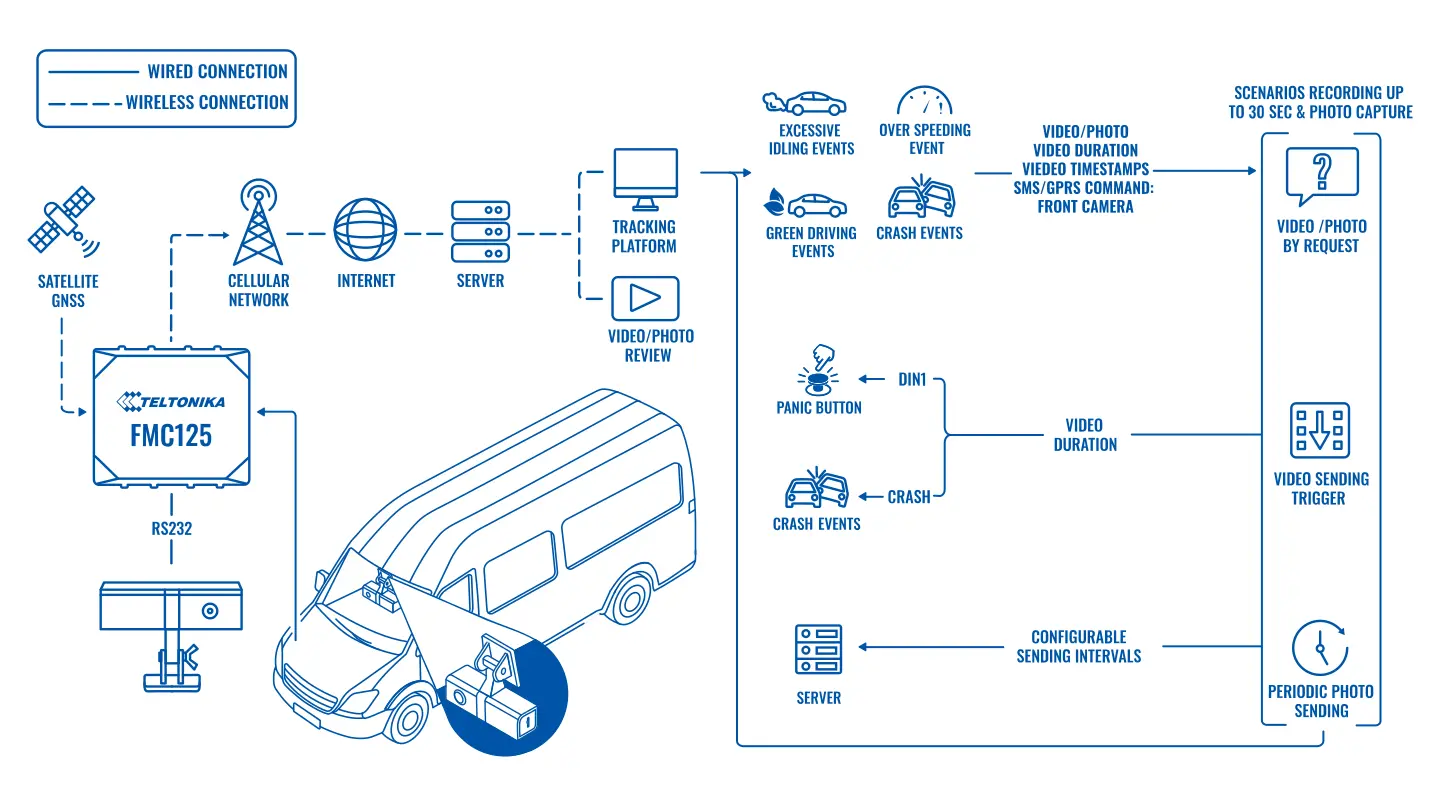
In the Teltonika example the FMC125 is used: a tracker with 4G LTE Cat 1 and an RS232 serial port, which is where the camera connects. The FMC225 suits the same arrangement if a different specification is needed.
The DashCam is mounted on the windscreen. It films the road ahead and the other road users: vehicles, pedestrians, traffic lights. Video is recorded at 720p with the H.265 (HEVC) codec, which gives a decent picture at a modest file size. That matters for sending over a mobile network: the clip goes out faster and uses less data.
The camera records the whole time the vehicle is working and holds up to 36 hours of video on a microSD card of up to 64 GB. It is not the whole stream that goes to the server, only the fragments that are wanted.
A clip is sent automatically in two cases: the tracker has recognised a collision from the accelerometer, or the driver has pressed the panic button. What goes to the server is 5 seconds before the event and 5 seconds after, 10 seconds in all. That is enough for a manager to grasp the picture, and no data is wasted.
If more is needed, video is requested with a command over SMS or GPRS. The request can be tied to events: speeding, harsh acceleration or braking, a sharp turn, towing, signal jamming. You set the length yourself, up to 30 seconds per clip. The camera can send stills as well, on request or at set intervals. A still every half hour suits delivery services: it shows that the vehicle really was at the right entrance and not in the yard next door.
How this looks in practice. A company lorry is stopped at a junction, a car runs into the back of it, and the car driver later claims the lorry reversed. The tracker records the impact, and a minute later the dispatcher has a clip on the server with the ten seconds before and after, and next to it the vehicle's speed at the moment of impact: 0 km/h. A conversation with the insurer does not get shorter than that, and the driver is not left carrying the blame for somebody else's mistake.
The solution is built on full-featured trackers, so everything else works too. EYE sensors for temperature, humidity and movement connect over Bluetooth LE, and BLE beacons are used to identify drivers or passengers, to keep track of trailers and as an immobiliser. The 1-Wire bus takes temperature sensors and RFID or iButton readers.
The FMC125 has two SIM cards. For vehicles that cross borders that is a direct saving: on leaving its home operator's area the tracker switches to the second SIM with a favourable tariff in the neighbouring country, and video, as everyone knows, needs more data than plain coordinates.
Put together, the fleet manager gains a single point of truth: the map with the track, the driver's events, and stills and video for the key moments. There is no need to match dashcam recordings against monitoring reports by hand.
Why not an ordinary dashcam off the shelf. It records the road as well, but the recording stays on the card in the vehicle. After a serious road traffic accident the card may be taken away, damaged or simply go missing, and a driver who is at fault is not always quick to hand it over. With the tracker and DashCam together, the key fragment reaches the server a minute after the impact, and the company sees it before the driver has had time to ring the office. A consumer dashcam also has no link to events: to find the right moment you have to scroll through hours of recording, whereas here the clip already sits at a point on the track flagged as a collision.
How it is rolled out across a fleet. First you decide which events will trigger a video: a collision and the panic button are almost always on, while harsh braking and speeding are added as required so as not to drown in clips. Then the length and quality of the fragments are set to suit the data tariff. At the first stage it is convenient to pick 10–15 vehicles on the most accident-prone routes, see how many clips arrive in a month and how useful they are, and only then roll the solution out to the whole fleet.
One more effect that gets mentioned less often: driver behaviour changes as soon as the kit is fitted. Once a person knows that harsh braking turns into a clip on the manager's screen, aggressive driving in heavy traffic drops noticeably within the first few weeks.
What you get
Evidence for every road traffic accident
Ten seconds of video around the impact and the tracker data show what happened and why.
The video arrives on its own
When the impact sensor trips or the panic button is pressed, the clip goes to the server without the driver doing anything, provided there is mobile coverage; it can be opened in the web interface and in the mobile app.
Fewer personal-data questions
The camera films only the road, and the driver's face is not in the frame.
Violations tracked in one system
Speeding, long idling, harsh manoeuvres and collisions appear next to the video, which helps to cut fines and repair costs.
Protection against staged collisions
A recording with time and coordinates destroys the he-drove-into-me story.
Material for driver training
Real clips of harsh braking work better than any written instruction.
Why this solution
Teltonika makes both the tracker and the camera, so the pair works without third-party gateways: the DashCam connects to the tracker's RS232 port, and events and video travel over one channel. For the fleet that means one device in the monitoring system rather than two different ones with separate servers.
The FMC125 and FMC225 are full-featured trackers with sensors, Bluetooth and 1-Wire, not just a dashcam with GPS bolted on. The camera can be added to a vehicle where fuel, drivers and temperature are already covered.
There are honest limitations as well. There is one camera and it looks forward: an impact from the side or the rear will only show indirectly, through how the vehicle reacts and what is visible in the frame. The 720p resolution is enough to read the traffic situation, but another vehicle's number plate at night and at a distance may not be legible. If cameras are needed along the sides, in the cab or in the body, that is a job for a multi-channel video recorder, not for a single DashCam.
The memory card is a consumable. With continuous recording it is worth replacing every year to eighteen months, and worth checking from time to time that recording really is happening: cheap cards fail more often from overheating.
Video retention is also worth settling in advance. Event clips sit on the server for as long as the system is configured to keep them, while the full stream covering 36 hours stays only on the card in the vehicle. If an investigation drags on, the fragment you need must be requested from the card before new recording overwrites it. Good practice is to set out in an internal procedure who downloads video after any road traffic accident and within what time, and who is entitled to view the recordings.
How this works in Azerbaijan. Video recording tied to a tracker is asked for most often by hauliers on the M-1, M-2 and M-3 roads, by delivery services and taxi firms in Baku, and by companies running corporate cars. Disputes after an accident in town, especially on the busy interchanges of Baku and on the approaches to Sumgait, are an everyday story, and ten seconds of video save weeks of argument with the insurer. Our windscreens get very hot in summer, so we mount the camera in the shaded area behind the mirror and advise buying industrial-grade microSD cards. For vehicles running to Georgia, Turkey or Russia, the second SIM in the FMC125 cuts video roaming costs noticeably. GPS.az fits the tracker and the DashCam, configures automatic clip sending on a collision and on the panic button, and feeds video and events into Wialon, where a clip opens straight from a point on the track.
Impact threshold and false events. The accelerometer trigger threshold is tuned on pilot vehicles: too low and every pothole becomes a collision, too high and light knocks are missed. The event card holds the type, the time, the coordinates, the speed and the clip itself. The response procedure is simple: the dispatcher opens the clip, rings the driver, and in the event of an accident saves the recording and the same day requests a longer fragment from the card if one is needed. We check the tracker firmware version for DashCam support during setup.
Related case studies
Related rollouts and equipment
Questions about the “Road video recording: tracker plus DashCam” scenario
Request a call
A specialist will call back and match a solution to your fleet and your task.