
Protecting lone workers with the GH5200 tracker
A Teltonika use case: an employee who works alone carries a personal GH5200 tracker with an SOS button, voice communication and a fall sensor, while the person responsible for safety sees him on the map and receives an alert at once.
A Teltonika use case: an employee who works alone carries a personal GH5200 tracker with an SOS button, voice communication and a fall sensor, while the person responsible for safety sees him on the map and receives an alert at once. A pipeline patrolman, an electrician at a substation, a security guard on a night site, a social worker out on visits, an agronomist in a distant field. They all have one thing in common: there are no colleagues nearby to notice if something has gone wrong. By some estimates there are about 53 million such workers in the world. If a person like that falls off a ladder, is injured or meets aggression, it is a matter of minutes. The use case shows how Teltonika closes this risk with a small standalone tracker that the worker carries throughout the shift.
What this scenario solves
According to a StaySafe study, 41% of incidents involving lone workers are caused by external factors: accidents, sudden illness, aggression and violence.
There are no colleagues nearby to notice an injury or call for help.
The manager does not know where the person is until he rings in himself.
In remote places even a simple injury can become dangerous because of the long wait for help.
According to a StaySafe study, 41% of incidents involving lone workers are caused by external factors: accidents, sudden illness, aggression and violence. There are no colleagues nearby to notice an injury or call for help. The manager does not know where the person is until he rings in himself. In remote places even a simple injury can become dangerous because of the long wait for help.
Who counts as a lone worker. Anybody who spends at least part of their time working without direct, close supervision: out on visits, on a night shift, at a remote site, in the field. Their risks differ from those of colleagues in an office or a workshop, and standard health and safety measures do not cover them.
What the risks are made up of.
• The work itself: violence from outsiders, stress and fatigue, dangerous equipment, working at height or near water.
• The person’s health: not everybody is medically fit to work alone, and a seizure or a fainting fit with no witnesses is especially dangerous.
• The place: rural or remote country, where help takes a long time to arrive and communication is unstable.
• The industry: in construction, municipal services and agriculture, workers often find themselves in situations where there is no hope of help from colleagues.
The main difficulty for a safety department is knowing where each such employee is at the moment and what is happening to him. Calls every couple of hours asking how he is do not work: a person may not answer because he is busy, or because he is lying unconscious.
What Teltonika offers
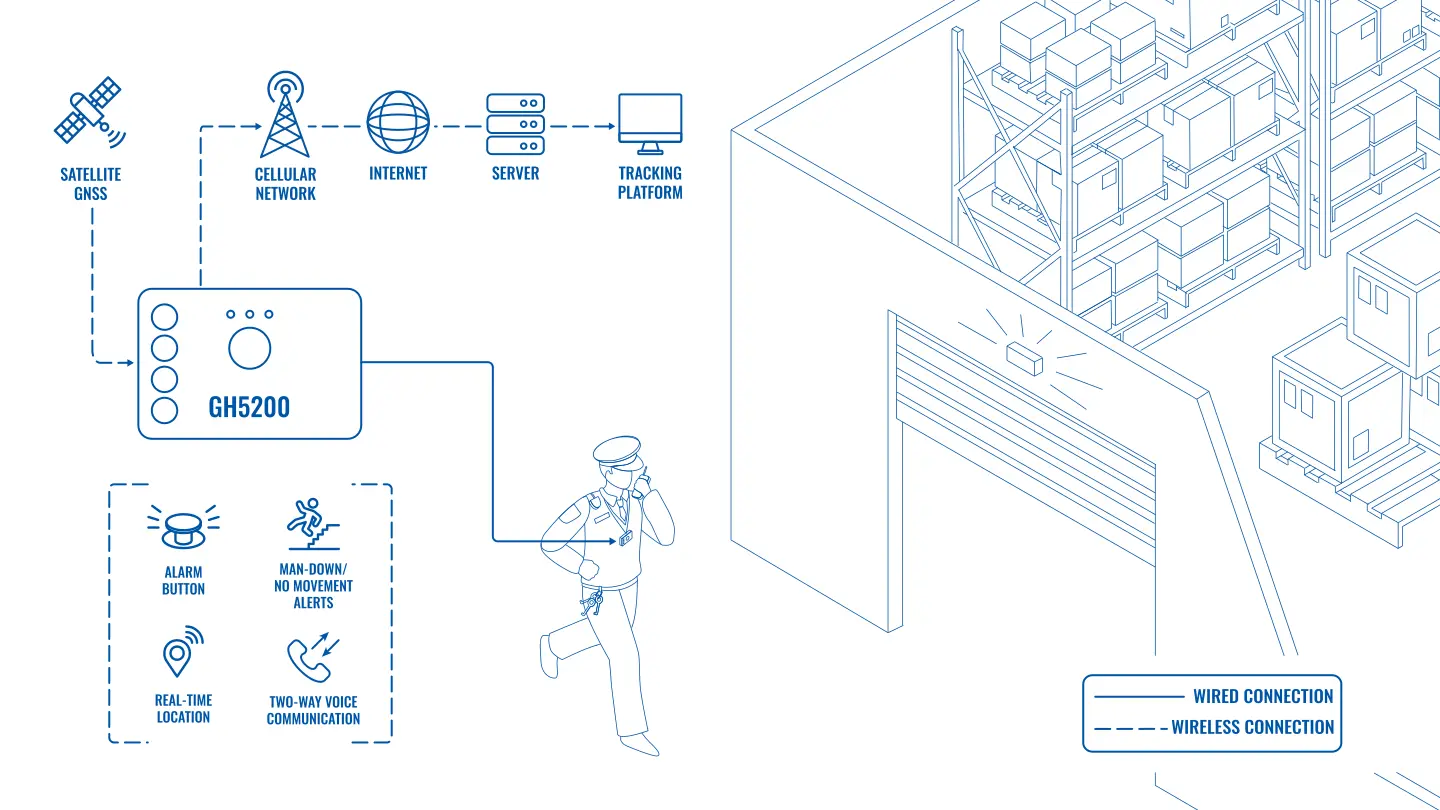
Teltonika suggests issuing every lone worker with a personal GH5200 tracker. The device constantly transmits coordinates, sends an alert at the press of a button, notices a fall or a lack of movement by itself, and lets the worker speak to the dispatcher straight away.
Installation and setup
Fitting the device and configuring it for the fleet scenario at hand.
Data transfer
The device collects data and sends it to the monitoring platform; how often depends on the model and its settings.
Analysis and control
The person in charge gets reports and alerts and looks into what stands out.
What the GH5200 is. A compact standalone tracker for personal tracking and safety. The built-in battery is designed for long operation without recharging, so the tracker does not depend on an external power supply. It has 5 programmable buttons, 2G connectivity, Bluetooth LE, a built-in accelerometer, LED indicators that can be configured to suit the task, and two-way voice communication.
How the arrangement works.
• Every employee who works alone gets his own GH5200 and carries it on a belt, on a lanyard or in a pocket.
• The tracker determines its location by GNSS and passes the data to the server.
• The person responsible for safety sees all the employees on the map in real time, 24/7.
The accuracy of the coordinates depends on the surroundings: inside buildings, in basements and among dense buildings GNSS works less well than in an open field, and that is worth allowing for when choosing the scenarios.
The SOS button. There is an easily reachable panic button on the housing. Pressing it sends an alert to the central system at once. Two-way voice communication supports up to 5 recipients of calls or SMS: the worker can speak to the dispatcher straight away or send a message without taking out a phone.
Automatic alerts. Not everybody is able to press a button: a person has fallen, hit his head, lost consciousness. For that, scenarios are programmed into the GH5200.
• A person falling. The accelerometer recognises a sharp fall and sends an alert.
• Movement and the absence of movement. If the tracker records no movement for too long, that may mean something has happened to the person, and the system will raise an alert.
An episode. An electrician is checking equipment at a remote substation on his own. He loses his footing on a ladder and falls. The GH5200 records the fall, then complete immobility, and sends an alert. The dispatcher sees the place on the map, tries to call the tracker over the speakerphone, gets no answer and sends a crew to the exact coordinates. Without the tracker this would have come to light only in the evening, when the man did not return to base.
Sensors close to the person. Over Bluetooth LE the tracker receives data from external accessories, from the Teltonika EYE Sensor for example: temperature, humidity, movement. That is useful where the conditions are themselves dangerous: cold stores, hot workshops, confined spaces.
What the safety department sees. All the employees with trackers are marked on the map, along with the time of the last point. Alerts are highlighted separately, with the type of event: SOS button, fall, immobility. For every alert the place is visible, along with the movement history for the last few hours and the tracker’s charge level. The reports show who was at a site and when, how long a patrol took, and whether there were any false alerts.
How to configure it so there are no false alerts. The immobility scenario for a guard at a post and for a pipeline patrolman has to be different: the first may quite reasonably stand still for half an hour, the second may not. The fall threshold is also matched to the job: for a fitter who is constantly sitting down and getting up, the sensitivity is set more carefully. In the first weeks after launch every trigger is reviewed and the settings adjusted. Otherwise dispatchers will get used to false alerts and stop reacting to them, and that is worse than having no system at all.
Different buttons for different tasks. Five programmable buttons make more than SOS possible: a start of work and end of work mark, a call to the dispatcher, a confirmation that all is well when asked. For the employee that is a couple of presses instead of a call from a phone.
The alert procedure. It is written before the trackers are issued. An example of the chain: an alert arrives, and within a few minutes the duty officer calls the tracker over the speakerphone; no answer — he calls the employee’s mobile and the nearest colleague or foreman; no answer there either — he sends people to the coordinates and, if necessary, calls the emergency services. Every step is noted in the log, so that it can later be reviewed to see where the chain dragged.
Roles and working hours. The map of all employees is seen by the safety department and the duty officer, while a site manager sees only his own people. Tracking is tied to the shift: the tracker is issued at the start and handed in for charging at the end, and the start of work and end of work buttons mark the boundaries. If a tracker passes to another employee, the assignment in the platform is changed the same day, otherwise an alert will arrive under the wrong name.
Managing a fleet of trackers. When there are dozens or hundreds of trackers, they are serviced remotely through FOTA WEB: firmware and configuration are updated automatically, devices are combined into smart groups, and a multi-level hierarchy of accounts is built. The safety department does not have to collect the devices in to change the number for emergency calls.
What you get
Help arrives sooner
The manager sees where every employee is and, on an alert, sends help to exact coordinates rather than to a description of somewhere on the site.
An alert without a press
The fall and immobility scenarios work even if the person cannot press the button himself.
Sensible deployment of people
The map shows who is closest to the incident, and help is sent from the nearest point, while in quiet periods the data helps to find unnecessary journeys in the routes.
Meeting health and safety requirements
The company can show that it has working measures in place for lone workers and reduce the risk of claims.
An objective history of events
After an accident the tracker records show what happened and when, and help in sorting out disputed situations.
People feel safer
When an employee knows that help will come at the press of one button, working alone on a night shift or at a remote site is easier on the nerves.
Why this solution
The GH5200 was made specifically for the task of keeping people safe: the SOS button, voice communication, fall and immobility recognition are gathered in one device. There is no need to combine a phone, a separate panic button and an app the employee may forget to switch on.
The tracker runs on a built-in battery, links over Bluetooth to EYE sensors and is serviced remotely through FOTA WEB. For a safety department that means trackers can be issued to all lone workers and managed from one place.
Honestly about the limits. The GH5200 works on the 2G network, so in places with no cellular coverage an alert will go out only when the tracker finds a network. In basements and inside buildings the coordinates are less accurate. The battery has to be charged, and that has to become part of the shift procedure: a flat tracker protects nobody. And most importantly, somebody is needed to take alerts round the clock. If nobody is watching the screen at night, the tracker will not save anyone.
It is worth explaining to people what the tracker is for. If it is seen as surveillance, it will end up in a locker. When an employee understands that it is there for his protection, the tracker gets worn.
How this works in Azerbaijan. The scenario is in demand with oil and gas contractors in Absheron and with pipeline patrolmen, with power engineers and water utility staff out in the districts, with security companies running night posts, with forestry workers and farm staff in the Kura-Araz lowland and the Sheki-Zagatala zone, and with builders on sites in Karabakh. When rolling it out, the Azercell, Bakcell or Nar coverage has to be checked on the actual working areas, especially in the mountains, the fall and immobility thresholds have to be set to suit the nature of the work (they are different for a guard at a post and for a patrolman), and it has to be fixed who answers an alert at night. GPS.az supplies and configures the GH5200, programmes the emergency contact numbers and brings the employees onto the Wialon platform, where the safety department sees them.
Related case studies
Related rollouts and equipment
Finding medical equipment in a hospital with beacons
Assets and workforce
Hard hat and PPE monitoring with the GH5200 tracker
Assets and workforce
The GH5200 personal tracker for workers
Agriculture, construction and mining
Questions about the “Protecting lone workers with the GH5200 tracker” scenario
Request a call
A specialist will call back and match a solution to your fleet and your task.