
Configuring trackers through the web version of TCT
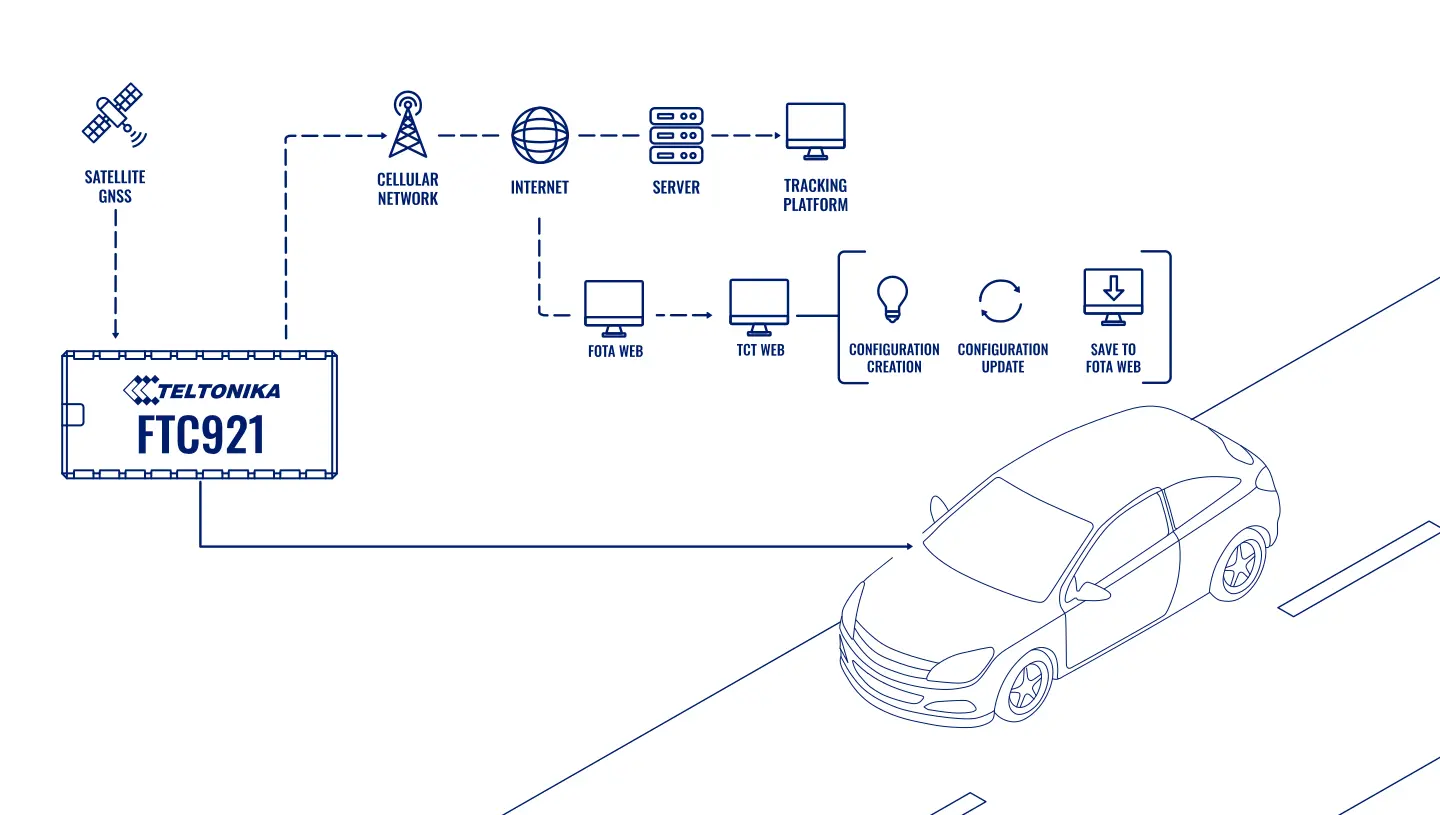
A Teltonika use case: a service provider configures FT trackers, FTC921 for example, in a browser through TCT inside FOTA WEB and sends the configurations over the air.
A Teltonika use case: a service provider configures FT trackers, FTC921 for example, in a browser through TCT inside FOTA WEB and sends the configurations over the air. When there are a dozen trackers, the configuration can be done by hand over a cable. When there are hundreds of them spread across different clients, the manual work turns into a workshop of its own: folders full of configuration files, notes saying this client has a different reporting interval, new staff who have to be trained, and inevitable mistakes. Teltonika has moved its TCT configurator (Telematics Configuration Tool) to the web and built it into FOTA WEB, its platform for remote device servicing. This use case is about how that shortens the path from “we need to change a setting” to “the setting is already on the tracker”.
What this scenario solves
The more trackers there are, the more time and the more people their configuration takes.
Staff switch between several programs for configuration, updates and diagnostics.
Files with a client’s individual settings are easy to mix up and send to the wrong devices.
A newcomer has to be taught at length which parameter does what.
The more trackers there are, the more time and the more people their configuration takes. Staff switch between several programs for configuration, updates and diagnostics. Files with a client’s individual settings are easy to mix up and send to the wrong devices. A newcomer has to be taught at length which parameter does what.
The market is growing fast. Teltonika quotes an estimate from Fortune Business Insights: the vehicle telematics market was valued at 79.17 billion dollars in 2023, and by 2032 it could grow to 170.35 billion. For a company that services fleets this means one thing: there will be more and more devices under management, while the technical staff cannot grow at the same rate.
Storing the configurations is a pain of its own. A service provider has dozens of projects, and every client has its own set of parameters: point frequency, sensors, outputs, alert scenarios. If the files sit on desktops and in email, sooner or later somebody will send the taxi configuration to the trackers on cement mixers. The mistake gets noticed when the client rings up asking why the sensor data has disappeared.
And finally, operating systems. The desktop configurator runs on Windows, while in the company one person is on Linux, another on a Mac, and the field engineer only keeps a tablet to hand. Every such case calls for a workaround or a change to the company’s internal rules.
What Teltonika offers
Teltonika has brought two tools together: TCT for creating and editing configurations, and FOTA WEB for sending them to devices over the air. Now all of it opens in a browser from a single account.
Installation and setup
Fitting the device and configuring it for the fleet scenario at hand.
Data transfer
The device collects data and sends it to the monitoring platform; how often depends on the model and its settings.
Analysis and control
The person in charge gets reports and alerts and looks into what stands out.

What FOTA WEB is. Teltonika’s cloud platform for remote servicing of trackers: firmware updates, sending configurations, managing companies and users, debugging tools. A tracker is already listed in the client’s account when it is bought, so there is no need to add it by hand.
What TCT is. The configurator in which a settings file is assembled for a specific model. Previously it was only a Windows application; now there is a web version, available straight from the FOTA WEB interface.
What it looks like with FTC921 as the example.
• The client receives an FTC921 tracker — it is already registered in their FOTA WEB account.
• A member of staff logs in to FOTA WEB and clicks the TCT icon. The configurator opens in a separate browser window.
• The FTC921 model is picked from the list of FT series devices, and the parameters required are set in the web interface.
• The finished file is saved straight into FOTA WEB, and from there it is sent to one tracker or to a group of devices over the air.
Editing instead of starting from scratch. If parameters need changing, the existing configuration is opened in the web version of TCT, edited and saved as a separate file. Even if the original file is not to hand, FOTA WEB can request the current configuration from the tracker itself; it is then edited and sent back. Changed parameters can be transferred on their own, without the full file, and that reduces the traffic on FT platform devices.
Prompts inside the configurator. The web version of TCT has a setup wizard: it walks the user through the main sections and explains what a given parameter is for. For a new member of staff that saves days of training, and it stops an experienced one from forgetting an important item.
A situation from a service provider’s practice. A client asks for the trackers on his vans to report points more often in town. Previously the technician would hunt for the right file through folders, open the desktop program, edit it, save it, upload it into another system and only then send it. Now he opens FOTA WEB, finds that client’s configuration, changes one line in TCT and sends it to the whole group of devices. The file stays in the account, and six months later any colleague can see exactly what was changed.
Works on any OS. Since everything opens in a browser, it does not matter what is installed on a member of staff’s computer: Windows, Linux or macOS. Internet access is enough, and if need be the job can be done from a tablet.
How this changes the department’s work. A technician’s typical day at a service provider used to look like this: client requests in the morning, a search for the right files and switching between the configurator, the update system and email during the day, a check in the evening on whether the settings had arrived. Now the chain is shorter: request, edit in TCT, send from FOTA WEB, check the status in the same place. The manager sees which configurations each client has and can share tasks out between staff without worrying that somebody is working with an old version of a file.
Versions, permissions and rollback. The set of parameters in TCT depends on the model and the firmware version, so before a file goes out to a group it is checked which firmware its trackers are running: a configuration assembled for another version may diverge on some parameters. Before a change is made, the current configuration is read from the tracker and saved as a separate file, so that if something goes wrong it can be sent back as the same kind of task. Staff access is separated by client company and by role in FOTA WEB, and the task history shows which file went to which devices and when. For a service provider that is the change log, and it does not then have to be reconstructed from email threads.
Who finds this especially useful. Integrators and service companies with a large number of clients, leasing and rental companies whose vehicles constantly change purpose, and large fleets with their own technical department. For a small fleet of five vehicles the difference will be less noticeable: there the configuration is done once and changed rarely.
What you get
Less spent on training
The built-in wizard with its prompts explains the parameters, so a new member of staff starts working with configurations sooner, without lengthy briefings.
Fewer mistakes with files
Configurations are stored in the FOTA WEB account next to the devices rather than in folders and email, so the chance of sending somebody else’s file is noticeably lower.
Any operating system
The web version opens on a PC, laptop, tablet or smartphone with internet, and a company does not have to change its own rules about operating systems.
No extra steps
A file that has been created or changed is saved straight into FOTA WEB, with no downloading and uploading again.
One login instead of several programs
TCT launches from FOTA WEB in one click, and the technician does not jump between desktop applications.
Setting history to hand
The configurations of every project stay in the system, and a year later it is clear what was changed and when.
Why this solution
For companies that service other people’s fleets, the main cost is not the hardware but the technicians’ time. Teltonika deals with that time on the manufacturer’s side: a tracker arrives already tied to an account, is configured in a browser and is updated over the air. It is the same logic on which Teltonika builds the whole range: a device should be serviceable remotely throughout its working life.
There are limits worth knowing about as well. Sending a configuration over the air requires the tracker to be in contact — if the vehicle is standing in a garage with no coverage, the file will arrive when it drives out. The first setup of complex sensors (an Escort fuel level sensor or a tachograph, for instance) is still worth checking on site right after fitting: remotely there is no way to see whether the sensor has been calibrated correctly against the tank.
The FTC921 example shows work with the FT series, but the FOTA WEB approach itself also suits the other Teltonika tracker ranges used for fleets.
How this works in Azerbaijan. Remote configuration is a particular help when vehicles rarely come back to Baku: articulated lorries on the M-2 and M-3, contractors’ vehicles in Karabakh and East Zangezur, agricultural machinery in the Kura-Araz lowland, buses out in the districts. Calling a vehicle like that in to the workshop to change one parameter means a day of downtime, whereas over the air the change goes out in minutes, as soon as the tracker comes back into contact through Azercell, Bakcell or Nar. When rolling this out we advise clients to agree a settings template for each type of vehicle in advance and not to change it without a log entry. GPS.az, as a Teltonika GOLD partner in Azerbaijan, fits the trackers, prepares and sends the configurations, and brings the data onto the Wialon platform where the client’s dispatchers see it (access via go.gps.az).
Related case studies
Related rollouts and equipment



Questions about the “Configuring trackers through the web version of TCT” scenario
Request a call
A specialist will call back and match a solution to your fleet and your task.