
FOTA WEB: remote tracker setup and updates
A Teltonika scenario for telematics operators: the FOTA WEB cloud platform makes it possible to configure, update and check thousands of trackers, the FTC921 for instance, without touching a single one of them.
A Teltonika scenario for telematics operators: the FOTA WEB cloud platform makes it possible to configure, update and check thousands of trackers, the FTC921 for instance, without touching a single one of them. The telematics market is growing fast. According to Fortune Business Insights, in 2022 it was valued at 72.85 billion dollars and by 2030 it could grow to 280.78 billion. For companies that fit and service trackers, that means more customers, more projects and more devices. The routine grows along with the number of devices: every tracker has to be configured before fitting, its firmware updated, its configuration changed when the customer decides to measure something new. Done by hand, that quickly becomes unmanageable.
What this scenario solves
The average telematics service provider looks after about 5.6 thousand devices across different customers.
Configuring one tracker by hand takes from 5 to 10 minutes.
Preparing 5.6 thousand devices will take more than 900 engineering hours.
After fitting, the trackers have to be updated and reconfigured, which means driving out to the vehicles all over again.
The average telematics service provider looks after about 5.6 thousand devices across different customers. Configuring one tracker by hand takes from 5 to 10 minutes. Preparing 5.6 thousand devices will take more than 900 engineering hours. After fitting, the trackers have to be updated and reconfigured, which means driving out to the vehicles all over again.
Customer projects differ. One has lorries with fuel sensors, another has courier vans, a third has personal trackers for its staff. Each has its own configuration, its own deployment schedule and its own service level agreement. Keeping all of that in your head and in scattered files is hard.
You can hire more engineers, but that is expensive. Teltonika estimates that the 900-odd hours of manual configuration would cost roughly 15,000 euros in extra outlay in Lithuania, and that is only the initial preparation. Routine servicing, updates and changes at the customer's request cost more still.
Then there is the human factor. An engineer configuring his hundredth tracker of the day will sooner or later get an APN, a server address or a sensor parameter wrong. The mistake only comes to light once the vehicle is already with the customer.
There is only one way out: a tool that lets trackers be managed in bulk and remotely, wherever the vehicle happens to be.
What Teltonika offers
FOTA WEB is Teltonika's cloud platform for all of its trackers: devices appear in the account by themselves after purchase, receive the right configuration when first switched on, and updates and health checks run remotely, in groups.
Installation and setup
Fitting the device and configuring it for the fleet scenario at hand.
Data transfer
The device collects data and sends it to the monitoring platform; how often depends on the model and its settings.
Analysis and control
The person in charge gets reports and alerts and looks into what stands out.
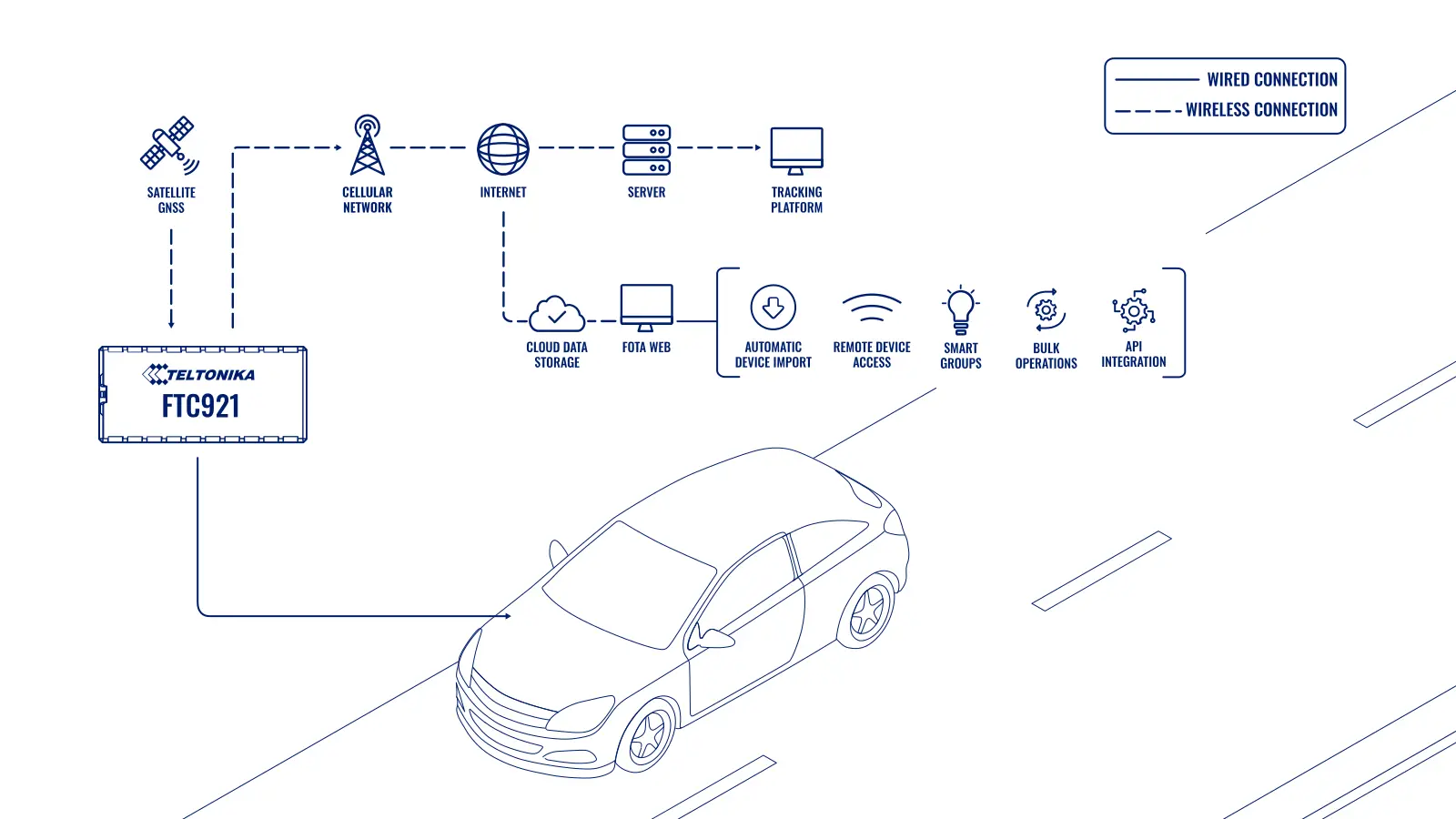
Take the FTC921 as an example. It is a next-generation tracker in the FT range. Everything described below works for other Teltonika devices as well.
Step 1. Devices arrive in the account on their own. As soon as a service provider orders trackers from Teltonika, virtual copies of them with images appear automatically in its company in FOTA WEB. Until the trackers are switched on, their status is inactive. This is a stockroom from which devices can be drawn for a particular project, for eco driving for a haulage customer, say.
Step 2. A structure of customers. Inside its own company the provider creates subsidiary companies — one per customer — and distributes the devices between them. Each subsidiary company has its own file storage: that is where the configuration for that customer's project is uploaded, or special firmware if it is needed.
Step 3. Configuration in advance. The configuration file is prepared in the Teltonika Configurator (TCT), uploaded to the relevant company, and a task group is created to update the selected devices. There is no need to configure each tracker individually.
Step 4. Fitting. The installer puts in the SIM card and connects the power. The tracker finds a suitable access point itself from its built-in APN database, gets onto the network and connects to FOTA WEB. The configuration update task is already waiting for it there, and it carries it out. A few minutes later the tracker is running the project settings, and the installer is already driving to the next vehicle.
A mixed fleet. Many customers have several types of task at once: heavy lorries, light commercial vehicles and personnel monitoring. Inside the customer's company the devices are sorted into groups, and each group is assigned its own firmware and configuration. FOTA WEB creates the update tasks for every device in the group itself.
A growing fleet. When a customer buys more vehicles, the new trackers only have to be added to the right group. Remote configuration starts automatically as soon as they get onto the network.
Watching tasks run. On the task group page, colour-coded statuses show what has been completed, what is in progress and what failed — because of poor mobile coverage, for example. Failed tasks can be restarted. The monitoring panel shows which trackers are connected and separately highlights those that have not connected to FOTA WEB in the last 24 hours. An engineer is sent only to the vehicles where the problem really does require a visit.
Integration through the API. Every management and monitoring action is available through the API. FOTA WEB can be linked to a vehicle monitoring platform, an ERP, a CRM or a ticketing system: a new customer is created in the CRM, for instance, and a subsidiary company and device group are created for them automatically. Less manual work means fewer mistakes.
What it looks like in an operator's working week. A customer rings on Monday: he wants the trackers on 80 vans to report more often in town and less often on the motorway. That used to mean a week of driving round car parks. Now the engineer changes the configuration in TCT, uploads the file to the customer's company and assigns it to the group. By the evening most of the vehicles are already running the new settings, and the list shows the handful that were off the network and will update later.
Firmware updates. Teltonika regularly releases firmware with new functions, support for new sensors and security fixes. Through FOTA WEB the new version is assigned to a group and the trackers download it over the mobile network. You can start with a test group of a few vehicles, make sure everything works, and only then roll the update out across the customer's whole fleet.
Diagnostics without a visit. If a customer complains that a vehicle has vanished from the map, the engineer first looks in FOTA WEB: when the tracker last connected, what firmware and configuration it has, whether its tasks have run. Often the problem is solved remotely — correcting the server or the APN, restarting a task. If a tracker has been off the network for more than a day, that is a reason to check the power and the SIM card on site.
Moving devices between customers. When a customer expands or, conversely, returns some of the trackers, the devices are transferred from one subsidiary company to another. They will automatically receive the new owner's configuration. Stock records for trackers are also kept in FOTA WEB: you can see how many devices are in the stockroom, how many are fitted and with whom.
Access for the team. Different members of the provider's staff get different rights: the installer sees only his own installations, the support engineer sees devices across all customers, the manager sees the statistics. That reduces the risk of accidental changes on someone else's customer.
How much time it saves. If manual preparation of one tracker takes 5–10 minutes, then with remote configuration all that remains is the physical fitting and a connection check. For a batch of hundreds of devices the difference is measured in weeks of engineering work.
How to confirm that an update went through. After each wave, three things are checked for the group: the firmware version and configuration file name in the device card, the task status and the time it last connected. Then, on a few vehicles, you look in the monitoring platform itself to confirm that points are arriving at the new interval and that the sensors are returning values. Devices with an error or with no connection are written up as a separate list and dealt with before the next wave, not after it.
What to bear in mind. FOTA WEB manages trackers, but it does not show them on a map and does not build reports for the customer — a monitoring platform is needed for that. Remote updating requires a connection: a tracker in a garage with no signal will receive its task only when it gets onto the network. Before a mass firmware update it is sensible to try it on a few devices. And one more thing: remote configuration will not fix a poor installation — power wiring, earth and antennas still have to be connected properly.
What you get
Firmware and configuration without site visits
Trackers are updated remotely, so every device has the latest functions and security fixes.
Devices appear in the account on their own
Everything bought from Teltonika lands automatically in the provider's company in FOTA WEB.
Groups instead of manual work
Firmware and settings are assigned to a group, and all its trackers, new ones included, receive them automatically.
You can see who is off the network
The monitoring panel shows trackers that have not connected for a day, and the engineer drives only to where he is needed.
Links to other systems
The API lets tracker management be built into an ERP, a CRM, a support desk and a monitoring platform.
Runs in a browser
The cloud platform needs no server of your own, and the documentation and answers to common questions are on the Teltonika Wiki.
Why this solution
FOTA WEB works with every Teltonika device and is built by the same manufacturer as the trackers. So a new model or new firmware is supported in the platform immediately, with no waiting for an update from a third-party developer.
The platform is designed for operators with thousands of devices and dozens of customers: subsidiary companies, groups, file storage and the API make it possible to build a process that grows with the business instead of running up against the number of engineers you have.
Teltonika provides the availability and security of the service along with support through its Helpdesk, and the Wiki holds instructions for setting up accounts and every FOTA WEB function.
How this works in Azerbaijan. For an integrator in Azerbaijan, remote management is particularly valuable because of the distances involved. Customers' vehicles work not only in Baku and across Absheron but in Ganja, Lankaran, Sheki and Nakhchivan, on construction sites in Karabakh and on the M-1, M-2 and M-3. A trip out to a single tracker in the regions is a whole day of an engineer's time. With FOTA WEB, trips like that are left only for physical repair or replacement. On mountain stretches and in remote districts the connection can be unstable, so update tasks there run with a delay — which is normal, and the status is visible in the platform. Teltonika trackers work with Azercell, Bakcell and Nar SIM cards, and the APN database can be extended in the configuration where necessary. GPS.az, a Teltonika GOLD partner in Azerbaijan, uses FOTA WEB to configure and service its customers' trackers, connects them to the Wialon platform and changes the configuration remotely when a fleet's requirements change.
Related case studies
Related rollouts and equipment



Questions about the “FOTA WEB: remote tracker setup and updates” scenario
Request a call
A specialist will call back and match a solution to your fleet and your task.