
An electronic trip logbook on the FMC003
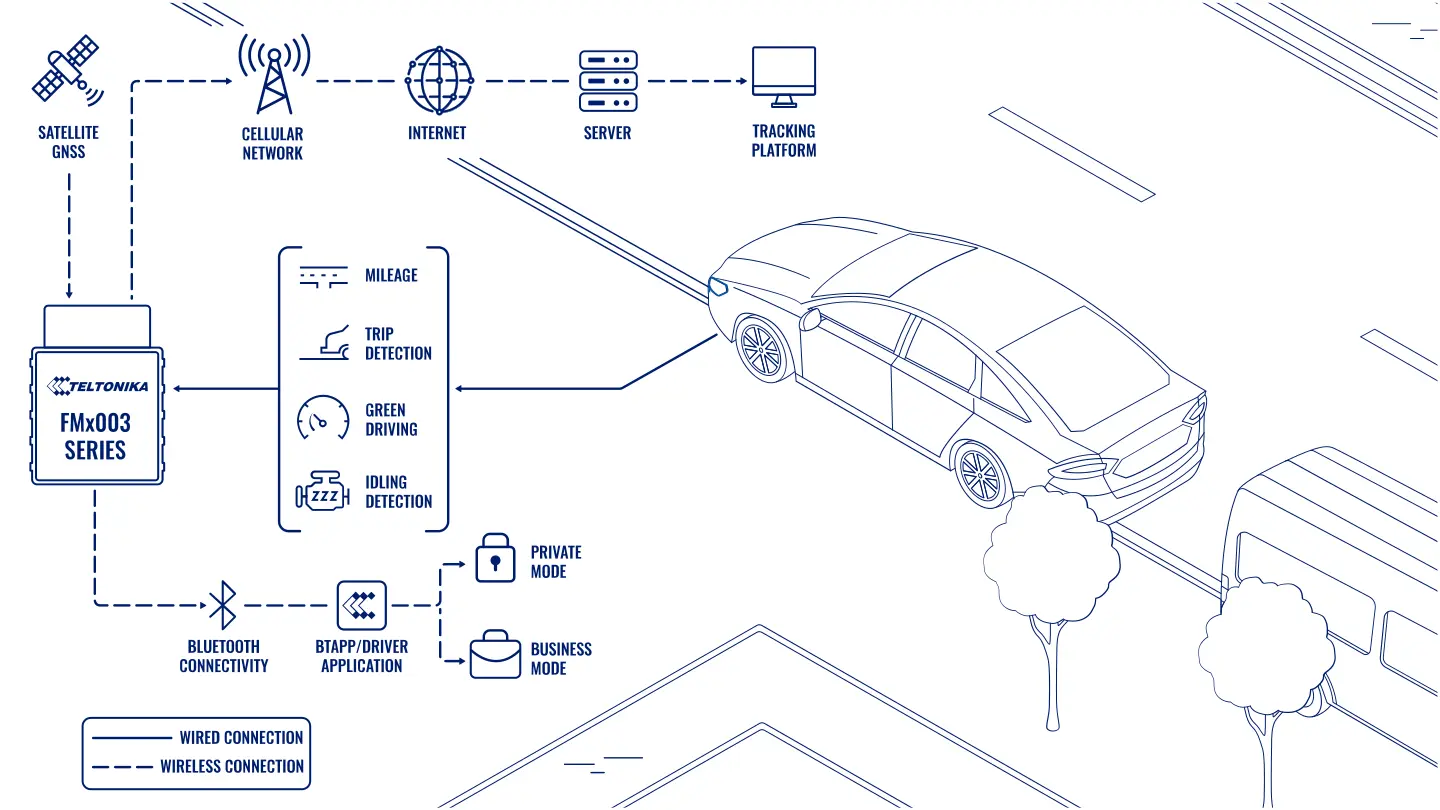
A Teltonika scenario for company vehicles: the FMC003 OBD tracker keeps the trip logbook itself — where and when the vehicle set off, who was driving, how far it went and for what purpose — separating business trips from private ones.
A Teltonika scenario for company vehicles: the FMC003 OBD tracker keeps the trip logbook itself — where and when the vehicle set off, who was driving, how far it went and for what purpose — separating business trips from private ones. A paper logbook gets filled in at the end of the day from memory, or even at the end of the month. Mileage is rounded off, purposes are written to a formula, and private trips sometimes end up counted as business. The accounts department then tries to reconcile it with the fuel receipts, and the manager tries to work out what each vehicle actually costs. An electronic logbook takes that data straight from the vehicle and from satellite navigation, and all the driver has to do is mark whether the trip is business or private.
What this scenario solves
A paper trip logbook is filled in after the fact and with errors.
Business and private trips in the same vehicle get mixed together, and the costs cannot be split honestly.
The manager cannot see where the vehicles go and why, or how long they spend idling.
The tax authority and the insurer need data that can be trusted.
A paper trip logbook is filled in after the fact and with errors. Business and private trips in the same vehicle get mixed together, and the costs cannot be split honestly. The manager cannot see where the vehicles go and why, or how long they spend idling. The tax authority and the insurer need data that can be trusted.
Once a fleet grows beyond a dozen vehicles, the paperwork grows faster than the fleet. Drivers spend time filling forms in, the manager spends time checking them, the bookkeeper spends time reconciling them with receipts. And the driver's responsibility is blurred: if something does not add up, nothing can be proved.
Add to that chaotic routes and long periods of idling. All of it feeds into fleet costs, cash flow, competitiveness and ultimately the company's reputation.
What Teltonika offers
The FMC003 plugs into the OBD-II socket and records every trip automatically: start, end, route, mileage, driver and mode — business or private — so the logbook builds itself.
Installation and setup
Fitting the device and configuring it for the fleet scenario at hand.
Data transfer
The device collects data and sends it to the monitoring platform; how often depends on the model and its settings.
Analysis and control
The person in charge gets reports and alerts and looks into what stands out.

What goes into the logbook. The place and time of departure, the driver identifier, the mileage at the start and end of the trip and the distance in full, driving style parameters (harsh acceleration, braking, cornering) and the purpose of the trip. Records like these can be exported for the tax authority, the insurer or an internal audit.
Where the mileage comes from. The FMC003 reads standard OBD data, and on many vehicles that includes the odometer — the same figures as on the dashboard. If a particular vehicle does not deliver mileage over OBD, the trip odometer takes over. It calculates distance from GNSS positions. That is not a reading from the vehicle itself, but the calculation is accurate enough for record keeping. The main convenience is that any vehicle's mileage can be seen from the office without walking up to it.
How the tracker knows a trip has begun. The settings include a trip section with a trip mode parameter. A trip begins when the ignition is on according to the chosen source, there is movement according to the chosen source, and the start speed has been exceeded. The start speed is the minimum speed at which movement counts as a trip, so that manoeuvring in a car park does not clutter the logbook. When one trip ends and a new one begins, the trip odometer resets to zero.
Business and private mode. This is the most useful function in the logbook. The driver selects the mode: business or private. In business mode the logbook records the trip and all the vehicle's events automatically. In private mode the logbook is switched off and the trip is not registered. This helps companies meet personal data protection requirements, and in Europe the GDPR in particular.
Who needs it most. Companies where the company vehicle is also used after work, at weekends and on holiday. In countries where company cars are taxed according to private use, the logbook provides accurate figures for the return. Sole traders and self-employed people can keep records of their own vehicle as a working asset.
Why OBD. Teltonika trackers in the plug-and-play OBD-II format suit light commercial vehicles: courier services, rental and leasing, insurance telematics. Fitting takes minutes and needs no installer.
What it looks like for the driver. In the morning he gets into the vehicle, selects business mode and drives his orders. In the evening he switches to private mode and collects the children from school — the company neither sees nor pays for those kilometres. At the end of the month he has not a single sheet of paper, and the bookkeeper has an accurate report on business mileage.
What to bear in mind. The rules on exactly how the mode is switched (by button, by driver card, in an app) and on who can see private trip data are worth setting out in an internal policy and explaining to drivers. Otherwise private mode will start being used during working hours as well. If a vehicle's OBD does not deliver mileage, the GNSS odometer may differ slightly from the dashboard.
What the report looks like. A table of trips over a period: date, start and end times, departure and arrival addresses, mileage for each trip, driver, mode (business or private), and the business mileage total for the month. Trips made in private mode do not appear in the logbook.
The boundaries of the project. The tracker keeps the logbook, but the form of the report for the tax authority or for internal accounting is chosen to fit the requirements your bookkeeper sets out. The company approves the rules on switching modes and on access to the data itself.
What you get
The logbook fills itself in
Trips, mileage and routes are recorded automatically, with no manual errors and no evening entries from memory.
Drivers answer for their own trips
Every entry is tied to a driver, and disputes are settled from the data.
The fleet on a map in real time
You can see where each vehicle is, its routes and its stops.
An honest split between business and private trips
The driver switches mode, and private trips stay out of the logbook and do not intrude on privacy.
Reports for the tax authority and the insurer
The logbook export rests on data from the vehicle and from satellites rather than on handwritten notes.
Lower fleet costs
Unnecessary trips and idling become visible and start to fall.
Why this solution
The FMC003 is an OBD tracker that is simple to fit, supports 4G LTE and has the trip logbook, the trip odometer and business and private mode switching built into its firmware. No additional buttons or modules are needed to get a working logbook.
Teltonika has shipped more than 35 million devices, and the OBD tracker range is designed for cars and light commercial vehicles, from passenger transport to courier delivery.
The trip mode and start speed settings can be changed remotely over FOTA WEB if the company decides to change its record-keeping rules.
How this works in Azerbaijan. An electronic logbook is for companies whose sales managers, service engineers and sales representatives have company vehicles — in Baku, Sumgait, Ganja and across the regions. It helps the accounts department justify fuel and mileage costs for company vehicles, and it lets the manager see where a vehicle is being used for private purposes. Exactly which documents the tax authority requires for company vehicle records is best confirmed with your own bookkeeper: the logbook supplies accurate data, and the form of the report is chosen to fit the requirements. In the summer heat in Baku traffic, vehicles spend a lot of time idling with the air conditioning on, and the logbook shows that honestly. GPS.az fits Teltonika OBD trackers, connects them to the Wialon platform and sets up reports on trips, mileage and the split between business and private travel.
Related case studies
Related rollouts and equipment

Questions about the “An electronic trip logbook on the FMC003” scenario
Request a call
A specialist will call back and match a solution to your fleet and your task.