
OBD-II data for a tracker over Bluetooth
Teltonika shows how to add engine data and fault codes to a simple FMT100 tracker: an inexpensive OBD-II dongle built on an ELM327 or STN1110 connects to it over Bluetooth.
Teltonika shows how to add engine data and fault codes to a simple FMT100 tracker: an inexpensive OBD-II dongle built on an ELM327 or STN1110 connects to it over Bluetooth. The vehicle monitoring market is growing fast, and competition between telematics providers and integrators is growing with it. An offer to show the vehicle on a map along with its trips no longer sets a company apart. Customers want more data for the same money, and nobody is in a hurry to replace trackers that are already fitted with expensive models. The Teltonika answer is to supplement the tracker with an external dongle that plugs into the diagnostic socket. The tracker stays as it was, and engine revs, temperature, fuel consumption and fault codes start arriving in the system.
What this scenario solves
Basic monitoring of coordinates and trips is no longer enough for customers.
Integrators have to offer more functions without raising the price appreciably.
Replacing hundreds of already fitted trackers with CAN-capable models is far too expensive.
An upgrade should take minutes rather than call for fitting all over again.
Basic monitoring of coordinates and trips is no longer enough for customers. Integrators have to offer more functions without raising the price appreciably. Replacing hundreds of already fitted trackers with CAN-capable models is far too expensive. An upgrade should take minutes rather than call for fitting all over again.
The market figures explain why the question is pressing. According to a report cited by Teltonika, the vehicle monitoring market was valued at 19.38 billion dollars in 2021 and by 2028 is expected to more than double, to 46.33 billion. More than 41% of it in 2020 was cars.
Hence the popularity of simple trackers with a basic set of functions. They are compact and inexpensive, quick to fit and configure, and well suited to company and private cars and to small vans. The trouble is that customer expectations keep rising. They want more than dots on a map, they want data on the state of the vehicle, and they are not prepared to pay more for it.
The integrator ends up in an awkward position. On one side, competitors are offering extended functions. On the other, there is a shortage of electronic components on the market, and replacing an installed fleet of trackers with dearer models eats into the margin. The ideal answer is to extend what the existing devices can do in a way that keeps fitting and updating down to a minimum of time.
What Teltonika offers
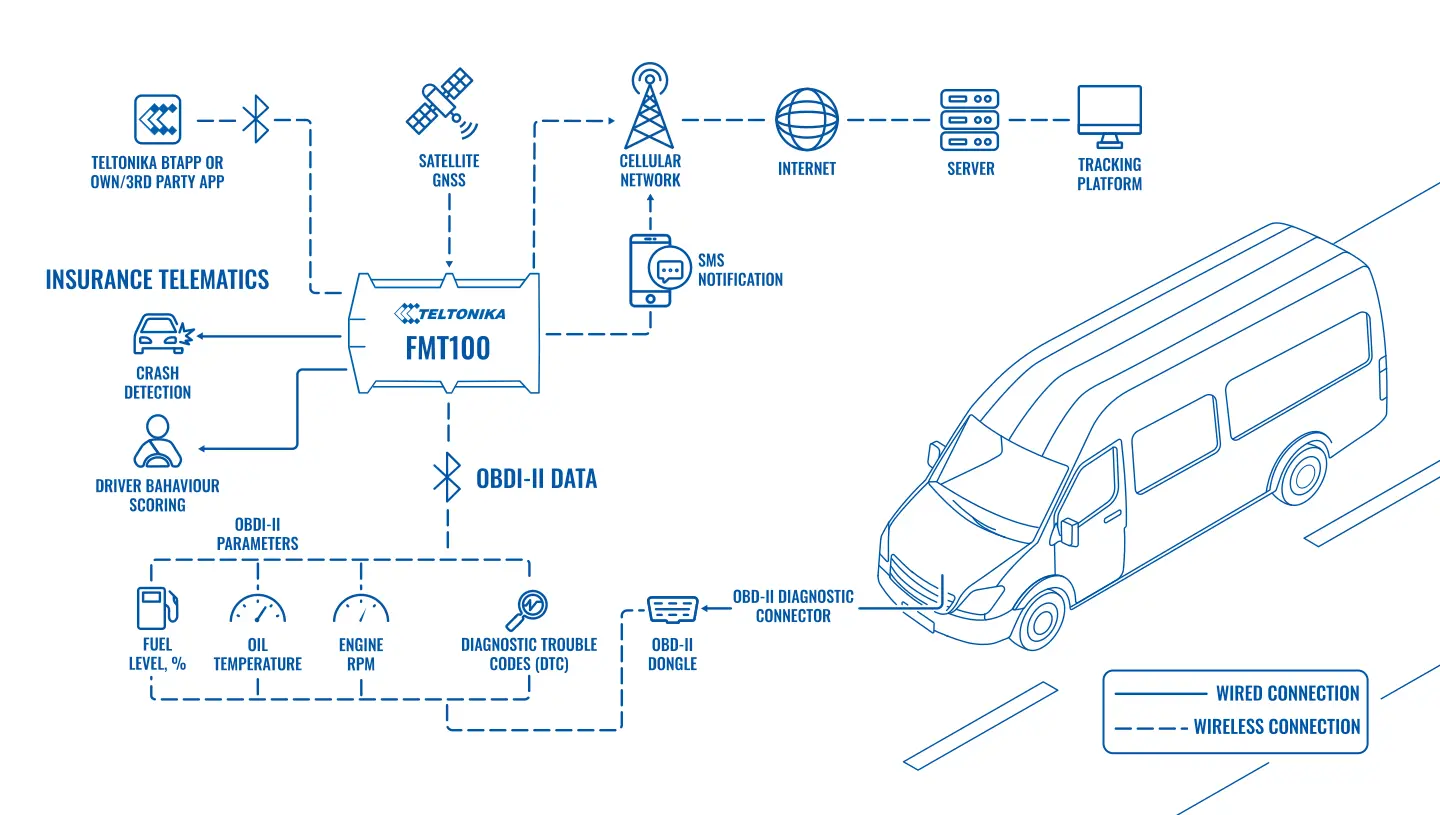
An OBD-II dongle connects to the FMT100 tracker over Bluetooth, reads the vehicle's parameters and fault codes, and the tracker sends them to the server together with the coordinates.
Installation and setup
Fitting the device and configuring it for the fleet scenario at hand.
Data transfer
The device collects data and sends it to the monitoring platform; how often depends on the model and its settings.
Analysis and control
The person in charge gets reports and alerts and looks into what stands out.
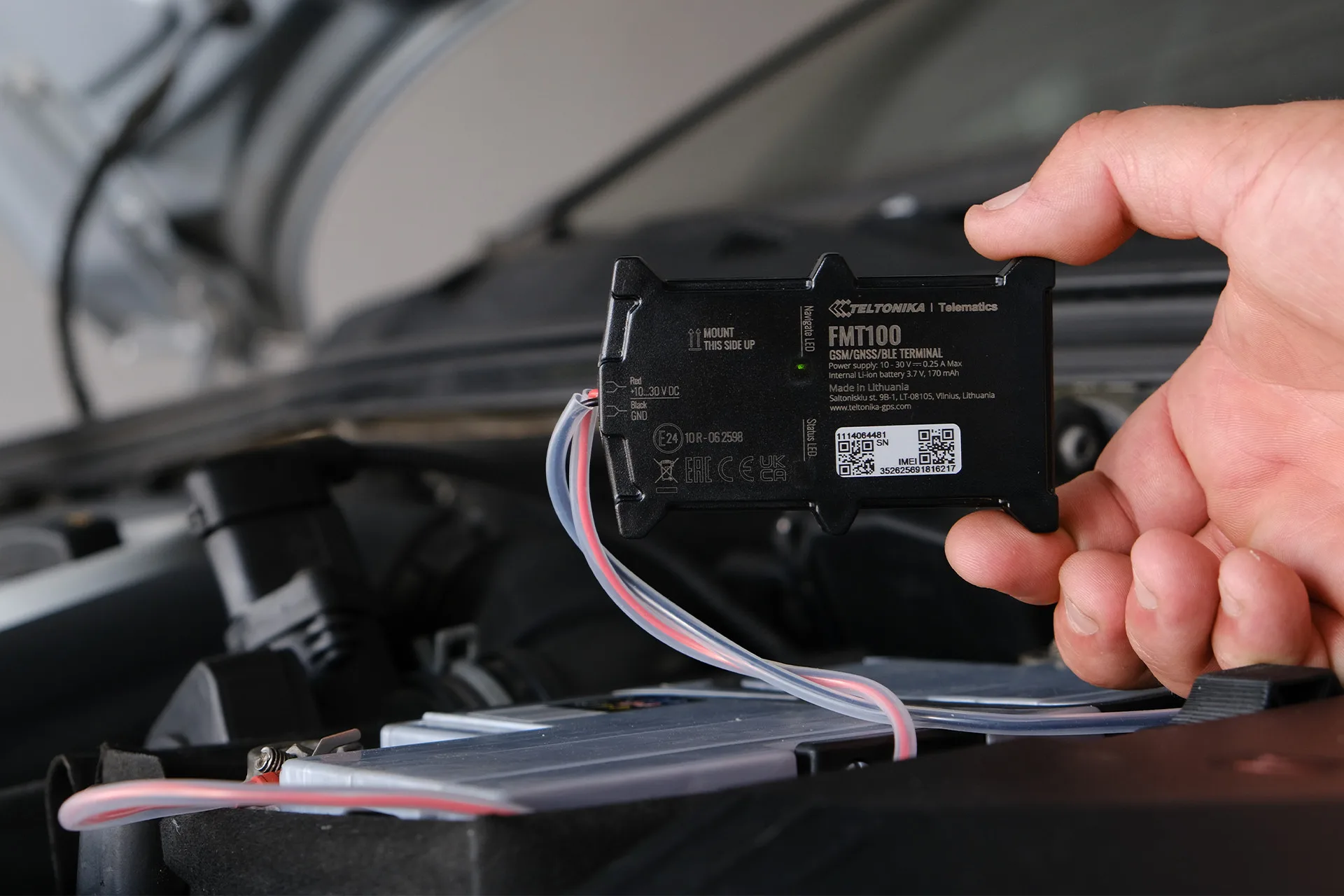
In its example Teltonika uses the FMT100 from the FAST & EASY range, designed originally for insurance telematics. The FMT100 itself is not an OBD tracker; it wires into the vehicle's power. The on-board diagnostics dongle plugs into the OBD-II socket and links to the tracker over Bluetooth. The result is a pair in which each device does its own job: the tracker handles coordinates, trips and events, the dongle handles data from the vehicle's electronics.
How it works. The dongle reads the parameters that are wanted along with fault codes and passes them to the FMT100 over Bluetooth. The tracker adds GNSS coordinates and insurance telematics data and sends the lot over the mobile network to the server for analysis and reports. The fleet manager sees two streams of data in one place: everything the tracker knows and everything the vehicle gives out.
One important condition: FMB series trackers work only with dongles built on ELM327 or STN1110 microcontrollers. Such adapters are widely sold and cost little, but before ordering a batch it is worth checking which chip a particular dongle is built on.
What can be tracked. The usual choices are speed, engine revs, oil and coolant temperature, fuel level and consumption, exhaust gas recirculation (EGR) faults and diagnostic trouble codes (DTC). The set depends on what a particular fleet needs and can be changed at any time. The exact list of available parameters is determined by the make, model and year of the vehicle.
How it is set up. First the dongle goes into the OBD-II socket — a minute's work with no tools. Then the Bluetooth section of the FMT100 is opened in Teltonika Configurator and the functions that are needed are switched on. In the OBD II section the parameters are picked from a list, each is given a priority, and the configuration is saved to the device. After that the data starts arriving at the server. If the result is not satisfactory, the list of parameters can be shortened or extended at any time.
Firmware updates and configuration changes on trackers that are already fitted can be made remotely through FOTA WEB, so the set of parameters can be extended across a whole fleet without going out to the vehicles.
An example. A company runs a fleet of company cars with FMT100 trackers that were fitted purely for trip records. A few months later the manager wants to see which vehicles have the Check Engine light on and who is driving with an overheated engine. Instead of replacing the trackers, a dongle is put into each car, fault codes and coolant temperature are added to the configuration — and the next day that data is in the reports.
Limitations. A Bluetooth dongle sticks out of the socket, so it is easy to pull out or to catch with a foot, and for vehicles with careless drivers it is better hidden on an extension lead. OBD-II parameters on cars are standardised, but manufacturers give them out differently and some may not be readable. On lorries with J1939 such a dongle will not do — those need other solutions.
What you end up with. New columns appear in the vehicle report: coolant temperature, engine revs, fuel level and a list of fault codes with the date, time and place where each appeared. Notifications are then built on them, for a new DTC or for overheating, for instance.
The limits of the rollout. The dongle reads only what the vehicle gives out over the standard OBD-II protocols. A fault code is a hint for the mechanic, not a diagnosis: interpreting it and carrying out the repair is the workshop's job. If parameters cannot be read on some of the vehicles, that shows up in the pilot, and for those vehicles either coordinates alone are kept or a different tracker is chosen.
What you get
More data without changing the tracker
An FMT100 that is already fitted starts sending engine revs, temperature, fuel consumption and fault codes once a dongle is connected.
Fitting in a minute
The dongle goes into the OBD-II socket with no tools and no trim to take apart, so the customer does not have to leave the vehicle for half a day.
Inexpensive hardware
Adapters built on the ELM327 and STN1110 are widely sold and fit any fleet's budget.
Servicing before a breakdown
Fault codes and engine temperature are visible at once, and a vehicle can be sent in before an expensive repair.
New services for the integrator
Diagnostics and vehicle condition reports are added to basic monitoring, which helps win projects against competitors.
Flexible configuration
The list of parameters and their priorities are changed in Configurator or remotely through FOTA WEB to suit a particular customer.
Why this solution
The strength of this approach is that it does not require throwing away equipment that already works. Teltonika trackers with Bluetooth can receive data from external devices, and an OBD-II dongle is one of the cheapest ways to make use of that. For an integrator it is a chance to offer a customer diagnostics without replacing hundreds of units.
Teltonika firmware and configuration are open to adjustment: parameters are picked from a list, priorities are set by hand, and the changes are pushed out to the whole fleet through FOTA WEB. Besides OBD-II, the trackers support driving behaviour monitoring, work with sensors and tags, real-time notifications and connection to most monitoring platforms.
How this works in Azerbaijan. This scenario suits company cars and small vans well: taxi fleets in Baku, corporate fleets at banks and service companies, distributors with sales representatives' cars that travel out to the districts — to Ganja, Sheki, Lankaran. Such customers often already have simple trackers fitted, and the question is put like this: can we see engine faults without changing the equipment? Points to allow for: a lot of vehicles in Azerbaijan were imported from different markets and built to different standards, and the set of parameters they give out over OBD-II is sometimes incomplete, so before ordering a batch of dongles we test them on two or three vehicles from the fleet. In summer at +40 °C a dongle in a socket under the dashboard gets very hot, and cheap models built on counterfeit chips are the first to fail in those conditions. GPS.az selects compatible dongles, configures the trackers in Configurator and brings fault codes, temperature and fuel consumption into reports and notifications on the Wialon platform.
Related case studies
Related rollouts and equipment



Questions about the “OBD-II data for a tracker over Bluetooth” scenario
Request a call
A specialist will call back and match a solution to your fleet and your task.