
How to protect a GPS tracker against tampering
A tracker that guards a vehicle needs guarding itself: without passwords, a keyword and a list of trusted numbers it can be reconfigured, switched off or have its data stolen, which is why Teltonika closes off every channel of access to the device.
A tracker that guards a vehicle needs guarding itself: without passwords, a keyword and a list of trusted numbers it can be reconfigured, switched off or have its data stolen, which is why Teltonika closes off every channel of access to the device. The security of the tracker itself is usually the last thing anyone thinks about. The device is fitted, the vehicle is on the map, everything works. But a tracker has SMS commands, Bluetooth, a cable for the configurator and a server it connects to. Each of those entrances can become a door for an outsider. This case study sets out what exactly can go wrong and which settings Teltonika offers so that access to the tracker rests with the owner and their integrator alone. The example in the case study is on the FMB130, but the same measures exist in every Teltonika tracker.
What this scenario solves
A tracker can be stolen and resold if it is easy to find and remove.
An attacker can send an SMS command and reconfigure the tracker to a different server or to the wrong parameters.
A tracker on factory settings is open to anyone who knows the standard passwords.
Through an unprotected channel, data on routes, customers and loads can be intercepted.
A tracker can be stolen and resold if it is easy to find and remove. An attacker can send an SMS command and reconfigure the tracker to a different server or to the wrong parameters. A tracker on factory settings is open to anyone who knows the standard passwords. Through an unprotected channel, data on routes, customers and loads can be intercepted.
What a tracker holds. Routes, customer addresses, delivery times, fuel consumption, the vehicle servicing schedule and data on valuable loads all pass through it. The company uses that data to plan routes, work out fuel consumption and service intervals and keep an eye on the security of its cargo. To a competitor or a thief it is information just as valuable as it is to the owner.
What happens when control is lost. If a tracker has been disconnected or reconfigured, the owner simply stops seeing the vehicle. At best that is a gap in the reports; at worst the vehicle is stolen at precisely the moment the tracking system has gone blind. For a large fleet it means hundreds of units to check over again; for a small company one lost vehicle can cost a month's revenue.
There is no such thing as absolute protection. The aim is something else: to make interference difficult enough that an attacker finds it easier to give up on the idea. The time and money spent on fitting and setting up a monitoring system ought to work for the owner, not be thrown away because of one forgotten setting.
The commonest mistake, in Teltonika's experience, is made before the vehicle even leaves the workshop: the tracker is fitted straight out of the box with the factory access parameters unchanged. The original settings are easy to look up or guess, and a password like that protects against nothing.
What Teltonika offers
Before the tracker goes into service a password, PIN code or keyword is set and access is restricted on each channel of communication — SMS, Bluetooth, the configurator and the server — after which an outsider's attempt to get in is simply rejected.
Installation and setup
Fitting the device and configuring it for the fleet scenario at hand.
Data transfer
The device collects data and sends it to the monitoring platform; how often depends on the model and its settings.
Analysis and control
The person in charge gets reports and alerts and looks into what stands out.

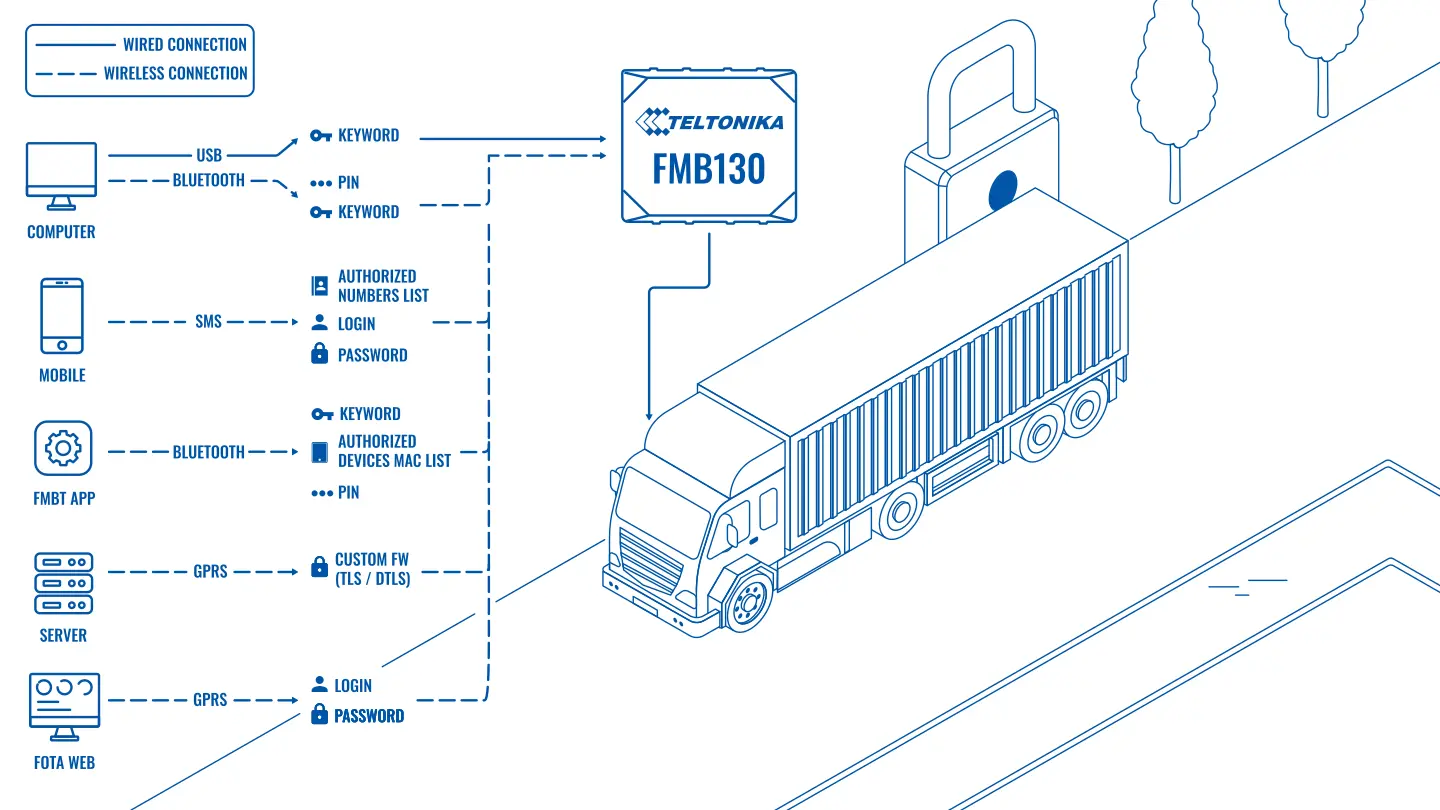
Passwords and keywords. A sound password should be at least 8 characters long and contain upper and lower case letters, digits and at least one special character. The same password across the whole fleet is convenient but dangerous: if it leaks, every vehicle is open at once. Better to divide access up by groups at the very least.
SMS and calls. Teltonika trackers accept SMS commands only with the correct login and password. On top of that you can fill in a list of authorised numbers, and the tracker will then carry out commands only from those phones and ignore messages from any other.
Bluetooth. A tracker can be connected to over Bluetooth from a phone, from the FMBT mobile app for configuration for instance. To stop an outsider in a car park doing so, a PIN code and a list of the MAC addresses of permitted devices are set in the tracker. A phone that is not on the list will not get a connection.
The configurator. Tracker settings are changed through Teltonika's configurator program on a computer. A keyword in the tracker closes off access to the configuration: without it a laptop connected by cable will neither read nor change the parameters. That protects both against settings being damaged by accident and against an attempt to reconfigure the tracker when it is removed.
The server and data transfer. Data between the tracker and the server can be carried over a protected channel with VPN encryption. Intercepting the traffic on the way and substituting something for it then becomes considerably harder.
All these settings are made in one place, in the Teltonika configurator: keywords, logins and passwords, authorised numbers, MAC address lists. They can also be changed remotely, together with a firmware update, without the vehicle visiting the workshop.
What to add in practice. Settings protect against remote interference but not against a person with a screwdriver. So the tracker is fitted out of sight, somewhere hard to reach, the power wiring is disguised, and notifications of loss of external power, loss of connection and the case being opened are switched on in the monitoring system. If a tracker suddenly falls silent in a car park, that is a reason to ring the driver straight away rather than in the morning.
Remote commands and a history of actions. Commands that change how the vehicle behaves, immobilising the engine through a tracker output for example, should be sent only by designated people. In Wialon the right to send commands is granted to individual users, and commands sent are kept in the unit's message history with the date and time. Immobilisation is set up so that it takes effect at a standstill or at the next start, not while the vehicle is moving. And the limit of what is possible: a protected tracker improves the chances of seeing and finding a vehicle but does not guarantee its return — detention and recovery remain a matter for the police.
What you get
Every access channel protected
Keywords, logins, passwords and lists of trusted contacts close off entry from phones, smartphones, computers, servers and the FMBT app.
Outsiders' SMS messages do not get through
Commands are accepted only with the correct password and from numbers on the authorised list.
Bluetooth for your own devices only
A PIN code and a whitelist of MAC addresses stop anyone connecting to the tracker from an outsider's phone.
Settings cannot be read without the key
The keyword in the configurator protects the tracker's parameters from being read or changed.
Protected data transfer
VPN encryption makes it hard to intercept or substitute data between the tracker and the server.
Everything configured in one window
Security parameters are changed in the configurator and remotely along with a firmware update.
Why this solution
In every Teltonika tracker the protection mechanisms are built into the standard firmware. There is no need to buy separate modules or special versions of the devices: the FMB130 and other models support passwords, authorised numbers, Bluetooth protection and the configurator keyword out of the box. The integrator's only job is to switch them on and not leave the factory values in place.
Another advantage lies in the way Teltonika updates devices. Firmware and settings can be changed remotely, so a fix released by the manufacturer reaches the whole fleet without trackers being removed and vehicles called back to base.
What to watch out for. A password every fitter knows is not a password any more. Keep the access parameters in one place, change them when you change installation contractor, and do not pass them around in the clear over messaging apps. Check that after any work on a tracker the keyword and the list of numbers are still in place.
How this works in Azerbaijan. The question of tracker security comes up here most often in three situations: thefts of expensive vehicles and plant, attempts by drivers to disconnect a tracker in order to hide unauthorised runs or a fuel drain, and a change of contractor where the previous fitter has kept access to the devices. On Azercell, Bakcell and Nar SIM cards it is worth switching off services you do not need and, where possible, using a corporate private APN from the operator — the terms are best checked with them directly. As Teltonika's GOLD partner in Azerbaijan, GPS.az changes the factory access parameters during fitting, sets the keyword and the list of authorised numbers, fits the tracker out of sight and sets up notifications in Wialon for loss of power and loss of connection, so that an attempt at interference is visible at once.
Related case studies
Related rollouts and equipment
Questions about the “How to protect a GPS tracker against tampering” scenario
Request a call
A specialist will call back and match a solution to your fleet and your task.